I am a lifelong artist, especially in the field of drawing, aged 57 years. I feel comfortable working in a variety of styles; literal or abstract, I work across a wide range of mediums and on a variety of scales, and I believe myself to be a good draughtsman. I possess the technical skill so often defined solely as drawing, by those who know little about what good drawing is.
Recently I’ve extended my practice into drawing on tablets so I thought I’d share my experiences. I’ve been using a variety of apps on an IPad, using an Apple Pencil version 1 and later, version 2. Mostly, I’ve drawn in Procreate, but I find it weak for painting, so I use Art Set 4 for painting and Procreate for drawing.
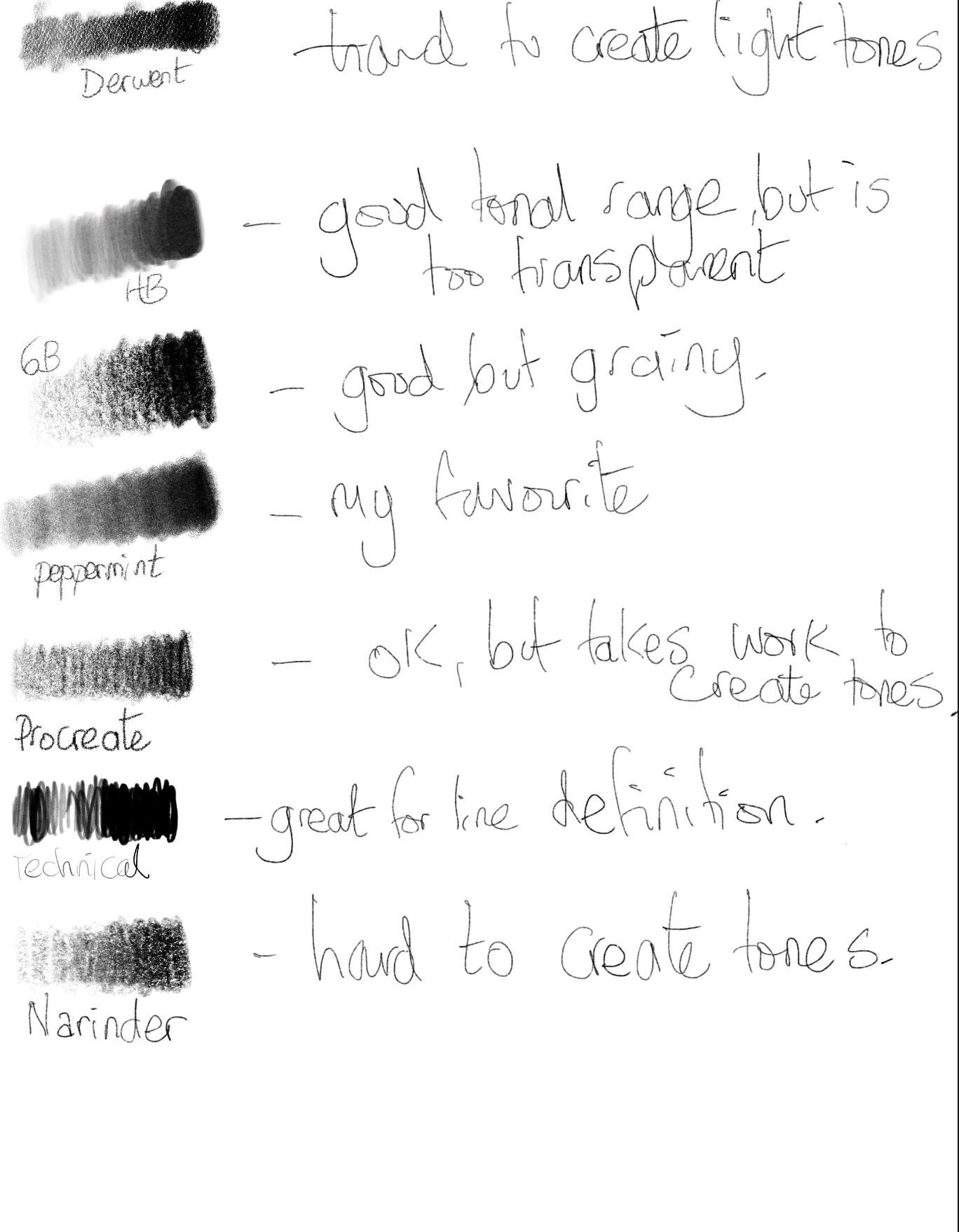
Procreate’s pencils are good, but they aren’t quite the real thing. They either draw precise lines, or they create wide tonal areas with little in between. You can play with the settings of course, but I’ve never been able to get it quite right. What this means in practice is that my pencil produces splurges of tone on occasion when I don’t want it. This is very frustrating. The pencils are also very pixelly, especially the 6B, which is trying to recreate the soft tones of a 6B pencil, but doesn’t quite work. The HB pencil is smoother, but has an annoying semi-opaqueness to it by default. Procreate doesn’t offer you a range of drawing paper surfaces, whereas Art Set 4 does and they are comprehensive and beautiful.

You are able to copy and paste layers between each app, which makes it very versatile for applying different effects and utilising the strengths of each app. I use Procreate for applying typography for example, but Art Set for making prepared grounds for drawing on to.
The significant danger of drawing with these apps is in tracing from photographs. It is so easy to do it and it produces amazingly realistic effects. I’ve been doing lots of anatomy drawing, so being able to trace sections in situ really aids the process of accuracy. What this reliance on copying does of course is promote the notion of precision above expression and, whilst some schools of drawing aim for this, in my experience it limits the artists ability to invent, imagine and express through drawing. Drawing ‘skill’ is so much more than being able to draw forms accurately. That said, if using a tablet to trace images helps some students grow in confidence when drawing then great, but there should not be a reliance on it. Students can just as easily draw from direct observation on a tablet without having to rely on photographic tracing.
So what are the strengths of drawing on a tablet? There are so many!
Firstly, this method is very forgiving. You can make hundreds of mistakes and the drawing surface never becomes damaged or worn. You can go backwards in time, undoing whole areas of drawing, then move it forward again, so that the drawing can be manipulated as a process in a whole new way, something that is impossible to do on paper.
Also fabulous is working on layers. Layers gives a whole new dimension to drawing. I can apply different areas of my work to different layers then alter their dominance, make them more transparent, change their hue or move them in front or behind other layers. I can hide layers momentarily or switch them off completely, all of which give me extra creative dimensions as an artist. That said, you do need to constantly remind yourself of which layer you are working on.
Masks are great too and I find myself using them more and more, both to preserve areas I don’t want to spoil and to cut out parts of my drawing to move to a new layer.
I also love being able to zoom in and out really quickly and rotate my canvas effortlessly. This added dexterity is really helpful, especially since I have worse eyesight than I used to. The fact that the iPad is lit enables me to work in poor light conditions too. I also bought a bean bag style lap stand so I can hold it comfortably whilst I’m working. I also purchased a surface film for the screen that replicates the texture of paper. This is really great and adds an extra dimension to the drawing feel.
Having such a massive array of tools, brushes and colour palettes at your disposal can be overwhelming at first. For me, as a pencil artist primarily, I don’t really use or need them. Many of them are gimmicks, like some novelty pencil sharpener I bought years ago that is stuck in my bottom drawer. However, it is so refreshing to be able to switch pencil or brush size, strength and colour so quickly. It becomes so intuitive that you forget how much time you used to spend hunting for your graphite sticks or the 4B pencils you bought last week. And I just love painting in Art Set. The paints and inks are just astonishing. I only wish I could tilt the iPad to make the paints run or pour clean water into areas. In art set there is even a hair dryer tool to dry the canvas. Again, it isn’t quite as good as really painting, but it is astonishing none-the-less. The convenience of being able to draw and paint whilst watching TV, without any mess is fabulous and has definitely made me draw more often.
So to summarise, I don’t think any digital art app captures the real thing perfectly, but then it has so many advantages and so many unique features that bring a whole new dimension to art that I love. I will always draw traditionally, and I’m pleased I learned the old-fashioned way, but I think digital art will form a huge part of my future practice.


Leave a Reply